LeadHub AI: Lead Capture, Qualification & Nurture CRM
What It Does
An automated lead management system that captures inquiries from five channels — website contact form, Cal.com bookings, Gmail, WhatsApp and chat widget bot relays, and LinkedIn — sorts them by where they genuinely came from, answers their questions automatically, classifies them with AI, and runs personalized nurture sequences based on how ready each lead is to buy. High-intent leads get AI-drafted follow-up emails with human approval before sending, and can be called by an outbound AI voice agent. The system handles the full booking lifecycle: instant confirmations with timezone-aware scheduling, pre-call reminders, context-aware cancellation and reschedule emails, and post-call outcome routing. Every workflow reports failures to a shared error handler, and the whole pipeline can be queried and operated from a Telegram message.
It is a live production system under continuous maintenance — not a finished demo. It carries a numbered defect register, dated amendment files, and documentation versioned alongside the workflows.
It is also the destination for the other two systems in this portfolio. A lead captured by the WhatsApp bot or the website chat widget arrives here through a tagged relay address and is qualified, nurtured and tracked without anyone touching it. The three projects are one estate, not three demos.
This one is not a sandbox. Submit the form and you enter the real pipeline: you’ll be classified, you’ll get the acknowledgment email, and you’ll receive the follow-up sequence a genuine enquiry receives. That’s the demonstration. Every claim below is one you can verify from your own inbox.
This connects to the live Request a Consultation form and booking flow. Use it if you have a real automation inquiry or want to schedule a discovery call.
The Problem
As a solo freelancer, leads come from everywhere — a form on my website, a Cal.com booking, an email, a WhatsApp message, a LinkedIn connection request. Each one needs to be read, evaluated, followed up on, and tracked. Do that manually for every inquiry while also doing client work, and things start falling through the cracks. A lead from Tuesday gets buried under Wednesday’s emails. A promising inquiry gets a reply three days late. The busier the pipeline gets, the worse the problem becomes — which is exactly when you can least afford to lose leads.
And it’s not just the initial contact. Leads ask questions, reschedule calls, cancel bookings, reply to follow-up emails with new information. Each of those events needs the right kind of response, not a generic one.
There was a second problem I only understood after the system was live: a pipeline you cannot see is a pipeline you cannot trust. Automation that runs unattended has to tell you when it breaks, and it has to be operable without opening the tool that runs it.
How It Works
Layer 1 — Intake and provenance (5 channels, 1 pipeline):
Leads arrive from a website contact form, Cal.com bookings, Gmail (including messages relayed by the WhatsApp and website chat bots, Upwork notifications, and direct emails), and Yahoo (LinkedIn notifications). Each channel normalizes its data into a standard format and hands it to the same central processing hub.
Before any email is looked up or classified, it is sorted by provenance — where it actually came from — using facts about the message rather than anything written in it: the sender address, the recipient address, and the tagged addresses the bots send to. Mail is routed as a bot relay, internal traffic, known junk, or genuine external mail. Unrecognized provenance is treated as external, not discarded — a wasted lookup is cheap, a lost client isn’t.
The Gmail pipeline processes exactly one email per iteration, no matter how many arrive in a single poll. That’s a correctness choice, not a performance one, and Section 4 explains what it prevents.
Layer 2 — Question answering:
Leads usually ask something in their first message — what it costs, how long it takes, whether I work with their industry. Those questions are answered automatically from a knowledge base, at two points: brand-new leads, and existing leads who come back with a new question (a rebooking note, or a repeat form submission). Both re-contact types converge on a single gate, so the rule lives in one place while serving two cases.
Layer 3 — Classification and qualification:
External mail is classified to filter out newsletters, promotions, and personal messages; anything that classifies unexpectedly is flagged for review rather than silently dropped. Confirmed leads are then assigned Hot, Warm, or Cold with written reasoning. Cal.com bookings skip the AI entirely — scheduling a call is the strongest intent signal there is. Duplicates are caught using each record’s unique database ID, and a lead already in a nurture sequence who books a call is upgraded to Hot with their sequence paused.
Layer 4 — Nurture sequences:
An immediate Day 0 acknowledgment, then a daily scheduler advances leads through their path:
Hot leads: Day 0 → Day 1 → Day 2 (then archived)
Warm leads: Day 0 → Day 3 → Day 7 → Day 14 (then archived)
Cold leads: Day 0 → Day 7 (then archived)
Cal.com leads skip the generic Day 0 email and archive immediately — their booking confirmation already does that job. All emails show timestamps in the lead’s own timezone with dynamically formatted labels. If one lead in a batch fails, the run continues with the rest.
Hot Day 1 and Day 2 emails are AI-drafted using references to my past projects, then sent to me to approve, skip, or revise — up to three rounds, counted in the database. Warm and Cold use templates and send automatically.
Layer 5 — Voice pipeline:
Hot leads can be called by an outbound AI voice agent running on Retell AI over a Twilio SIP trunk. After the call, Retell’s post-call extraction returns a structured outcome — booked, declined, bad timing, frustrated, or opted out — and a dedicated handler routes on it. Frustrated and opted-out are deliberately kept as separate outcomes, and both sit behind a human approval gate before any email reaches the lead.
Layer 6 — Booking lifecycle:
When a lead cancels or reschedules, the system detects whether the lead or I initiated the change. Lead-initiated changes get an automatic, personal-tone email. Changes I initiate go through the approval workflow so I can add context. The day before a call, a timezone-aware reminder goes out with a questionnaire link if it’s still outstanding.
Layer 7 — Discovery preparation:
Leads who book are invited to complete a short questionnaire about their business and the process they want to automate. A dedicated workflow validates the responses, stores them separately, emails me a summary, and flags the lead’s record. Repeat submissions update rather than duplicate. By the time the call happens, I already know the basics.
Layer 8 — Operations and observability:
Every workflow in the estate points at one shared error handler. If anything fails in production, an email arrives within seconds naming the workflow, the failing node, the error, the execution ID, and a direct link. The handler’s own email step is set to continue on error, so a mail outage can’t cascade into the alarm itself failing.
On top of that sits a natural-language operations agent — eight tools exposed over n8n Chat and Telegram: search leads, pipeline summary, change a lead’s path, mark won or lost, skip a touchpoint, pause or resume nurture, recover an archived lead, add a manual lead. Every write is gated behind a confirmation step, and the agent is required to search before it writes.
Architecture:
n8n, self-hosted on a Hostinger VPS. The CRM core is 15 workflows: four intake workflows, three sub-workflows, a question responder, a nurture scheduler, an approval processor, a questionnaire intake, a pre-call reminder, the two halves of the voice pipeline, and a shared error handler. The operations layer adds ten more — a router, an agent, and eight tool sub-workflows.
Screenshots
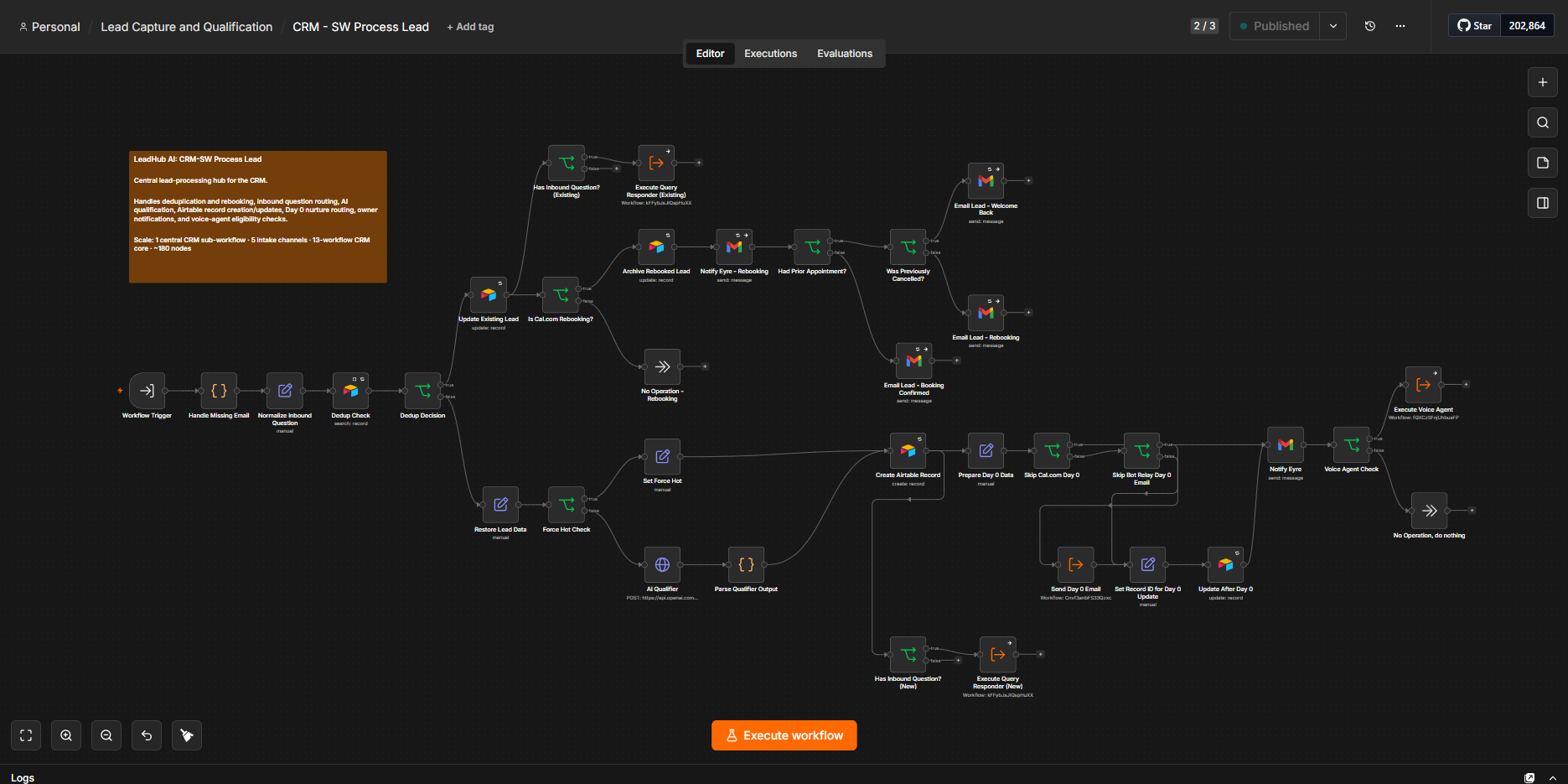
Central Processing Hub: CRM-SW Process Lead receives normalized lead data from the intake workflows and handles deduplication, rebooking, inbound questions, AI qualification, CRM updates, Day 0 nurture routing, notifications, and voice-agent eligibility checks.
Build scale: 15-workflow CRM core · ~180 nodes · 5 intake channels · 3 nurture paths · 8-tool Operations Agent
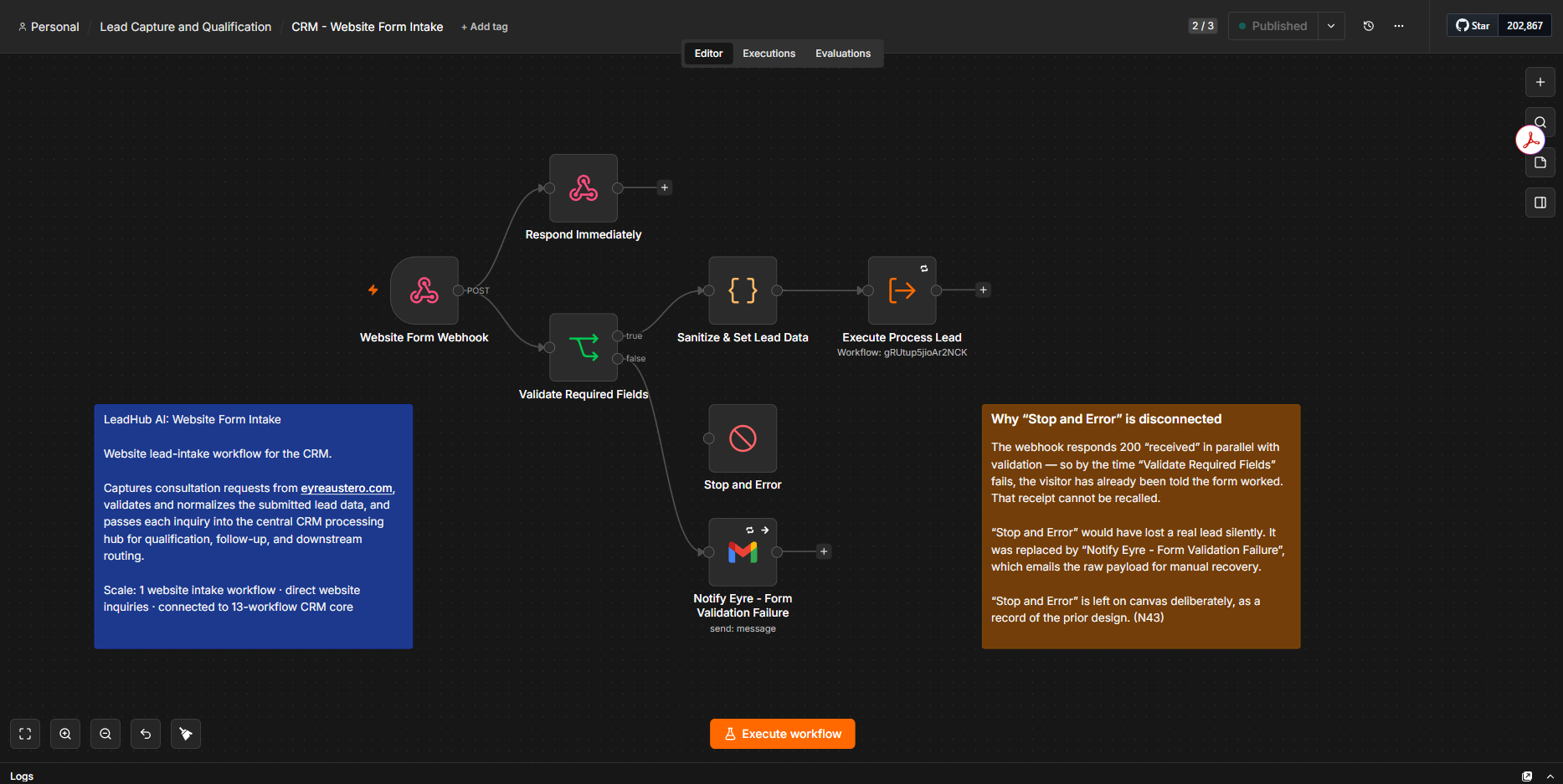
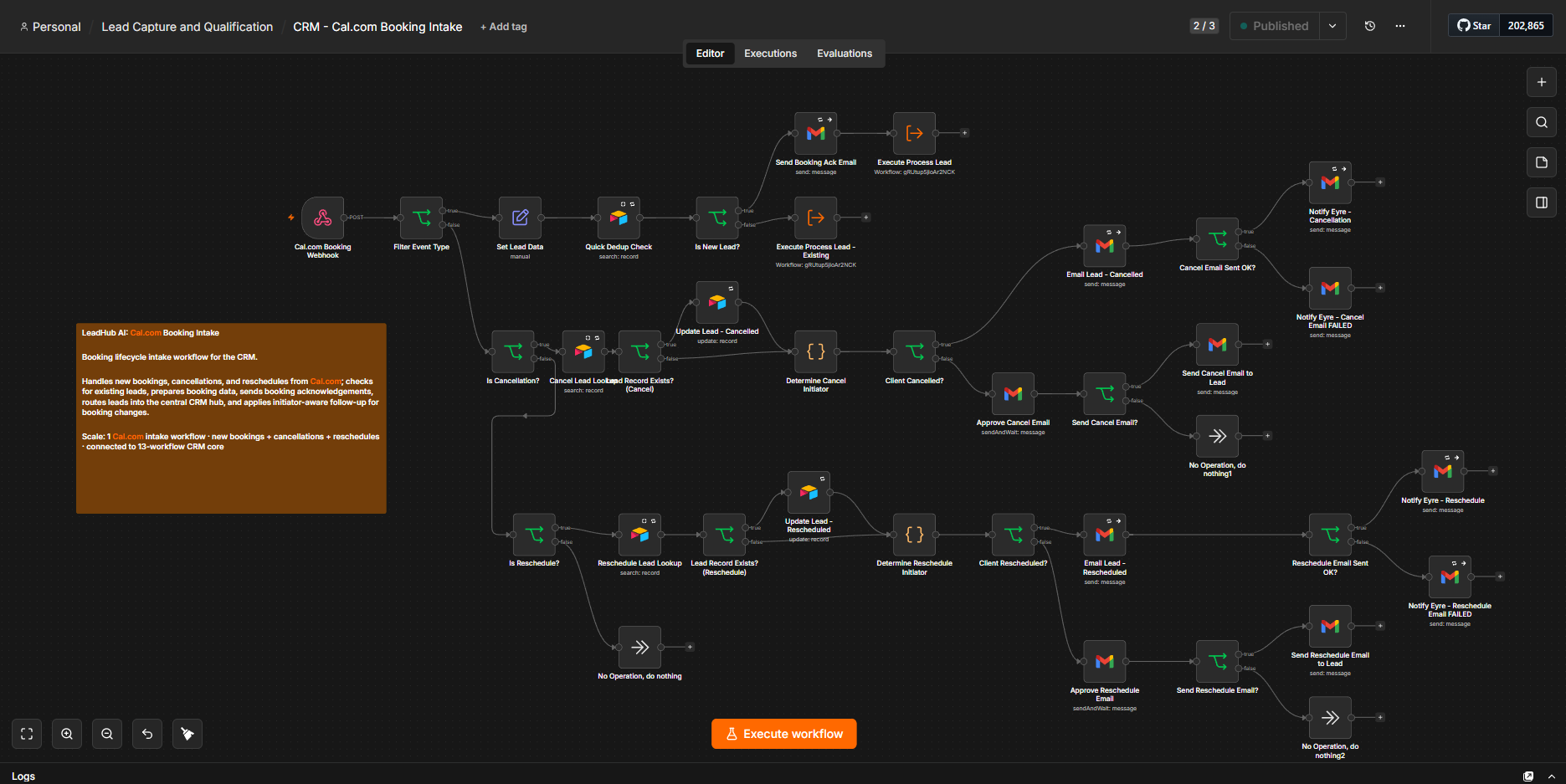
Direct Intake Workflows: website consultation requests and Cal.com booking events are captured through separate intake workflows, normalized into a common format, and passed to the central CRM processing hub.
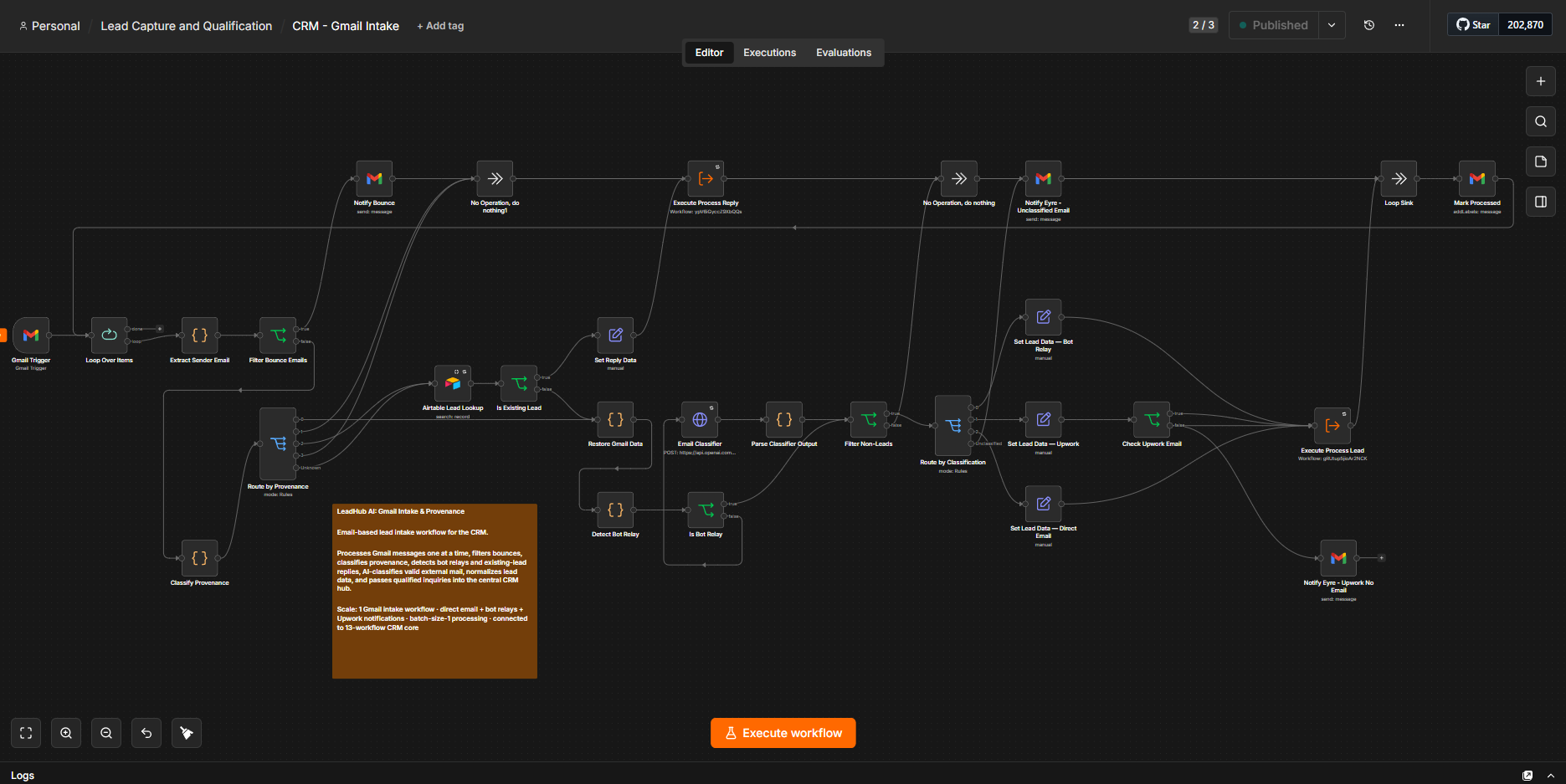
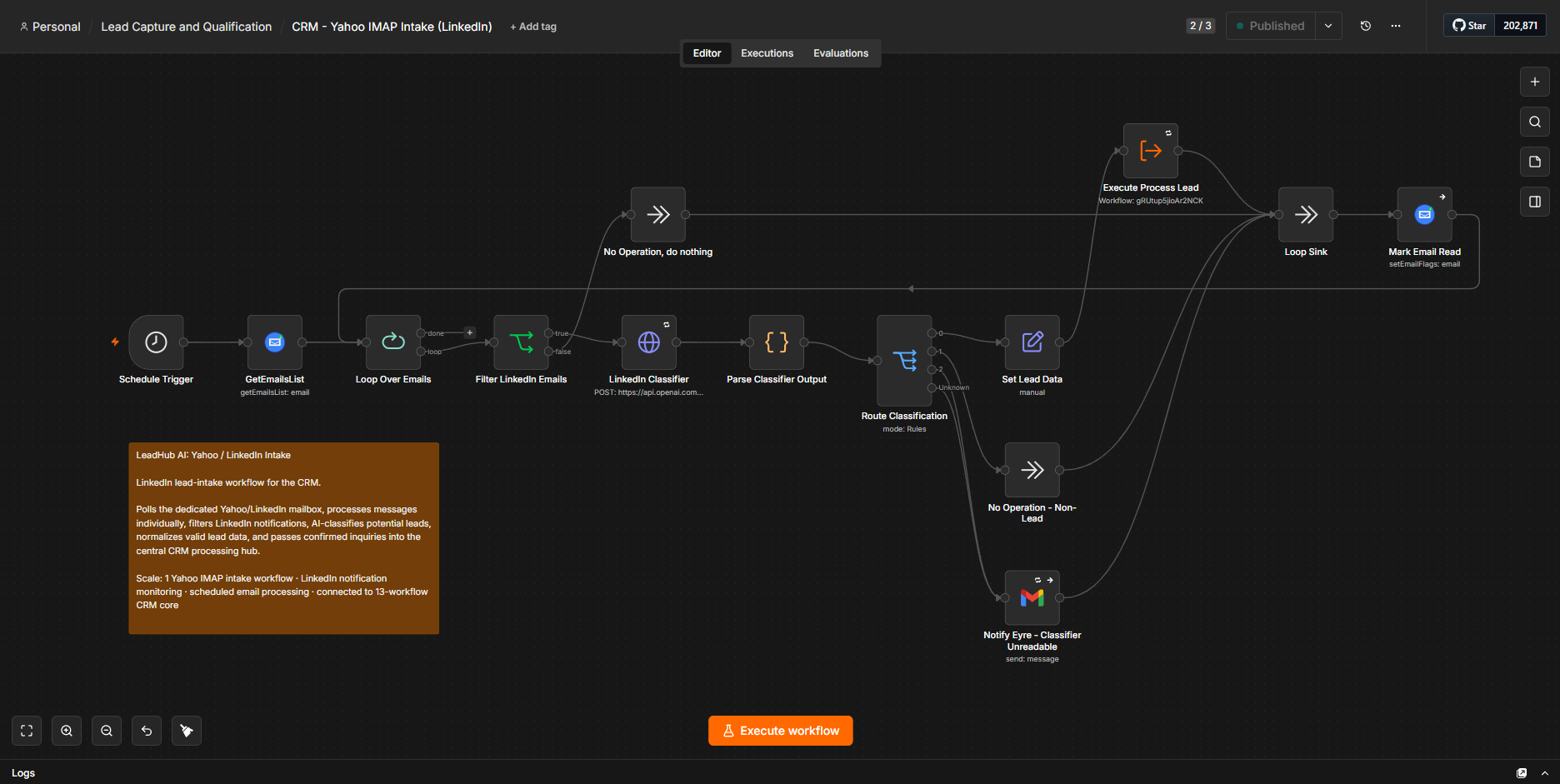
Email-Based Intake Workflows: Gmail and Yahoo intake workflows process direct email, bot-relayed inquiries, Upwork notifications, and LinkedIn notifications before normalizing valid leads and passing them into the central CRM processing hub.
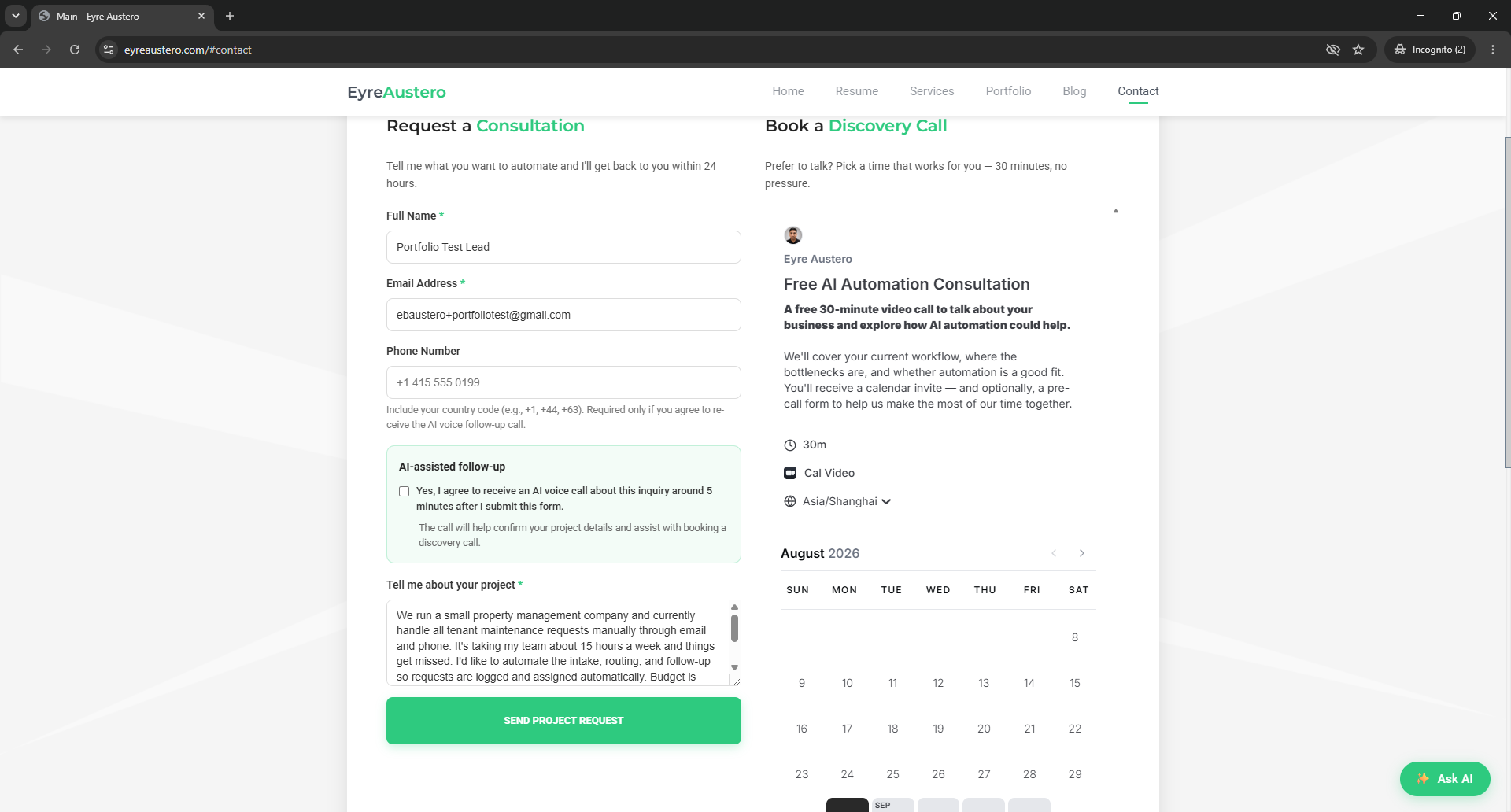
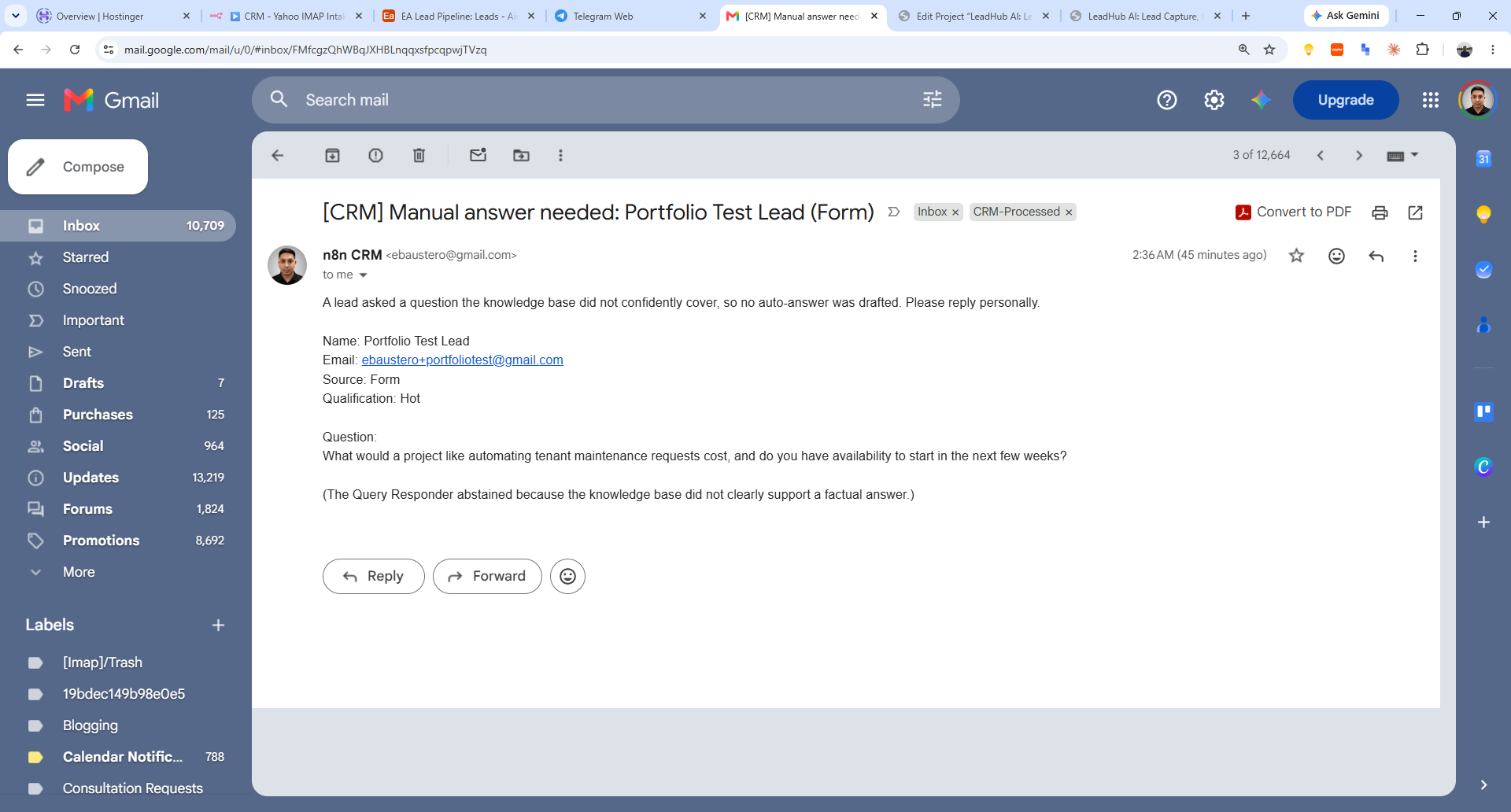
Grounded Answering with Human Escalation: This test inquiry was processed exactly as a real lead would be: qualified as Hot, recorded, and acknowledged automatically. The CRM then searched its knowledge base to answer the pricing and availability questions. Because the retrieved material did not support a specific price or current availability, it abstained instead of guessing and sent a Manual Answer Needed alert for human follow-up. Client-facing claims are only sent when the system can ground them in verified information.
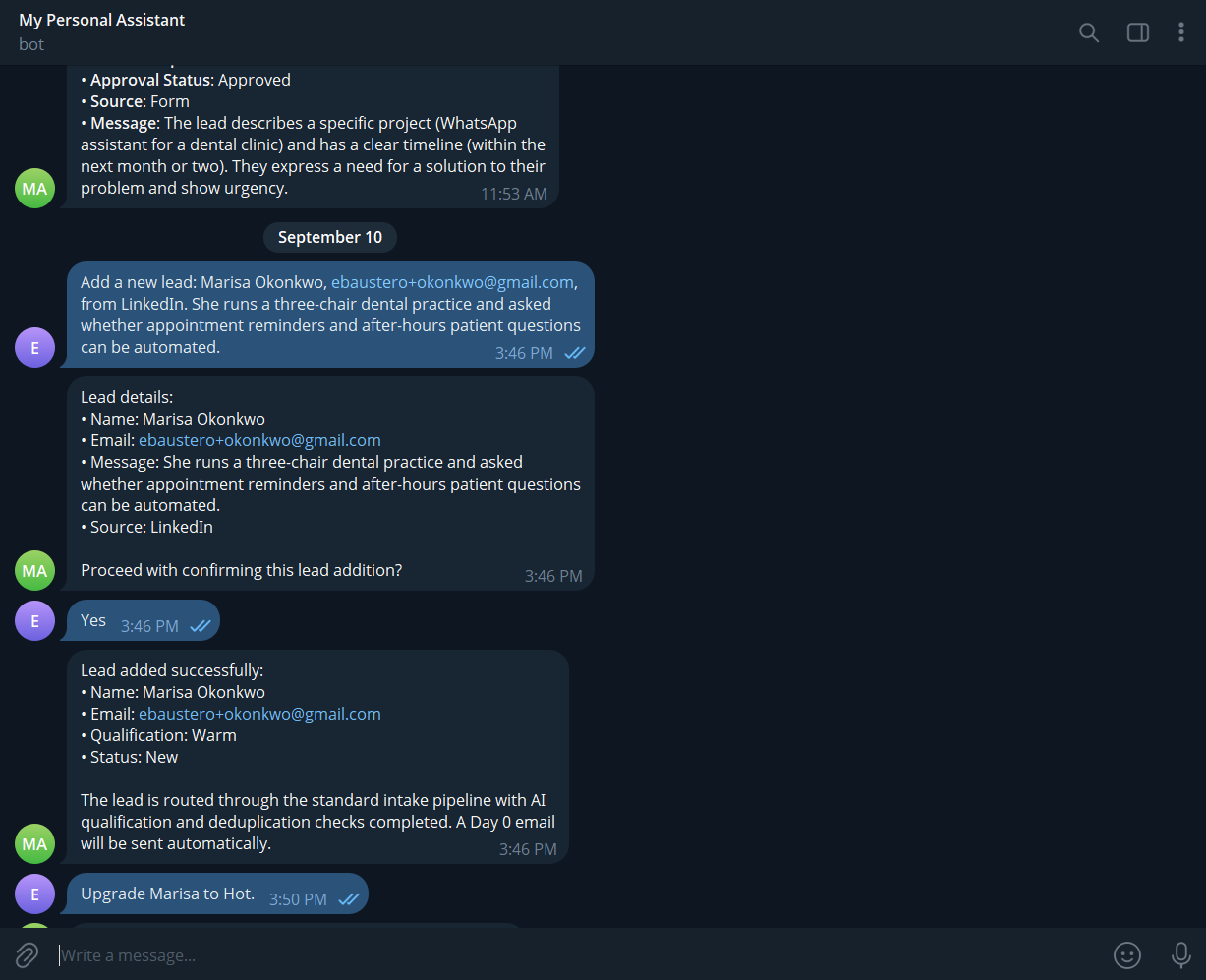
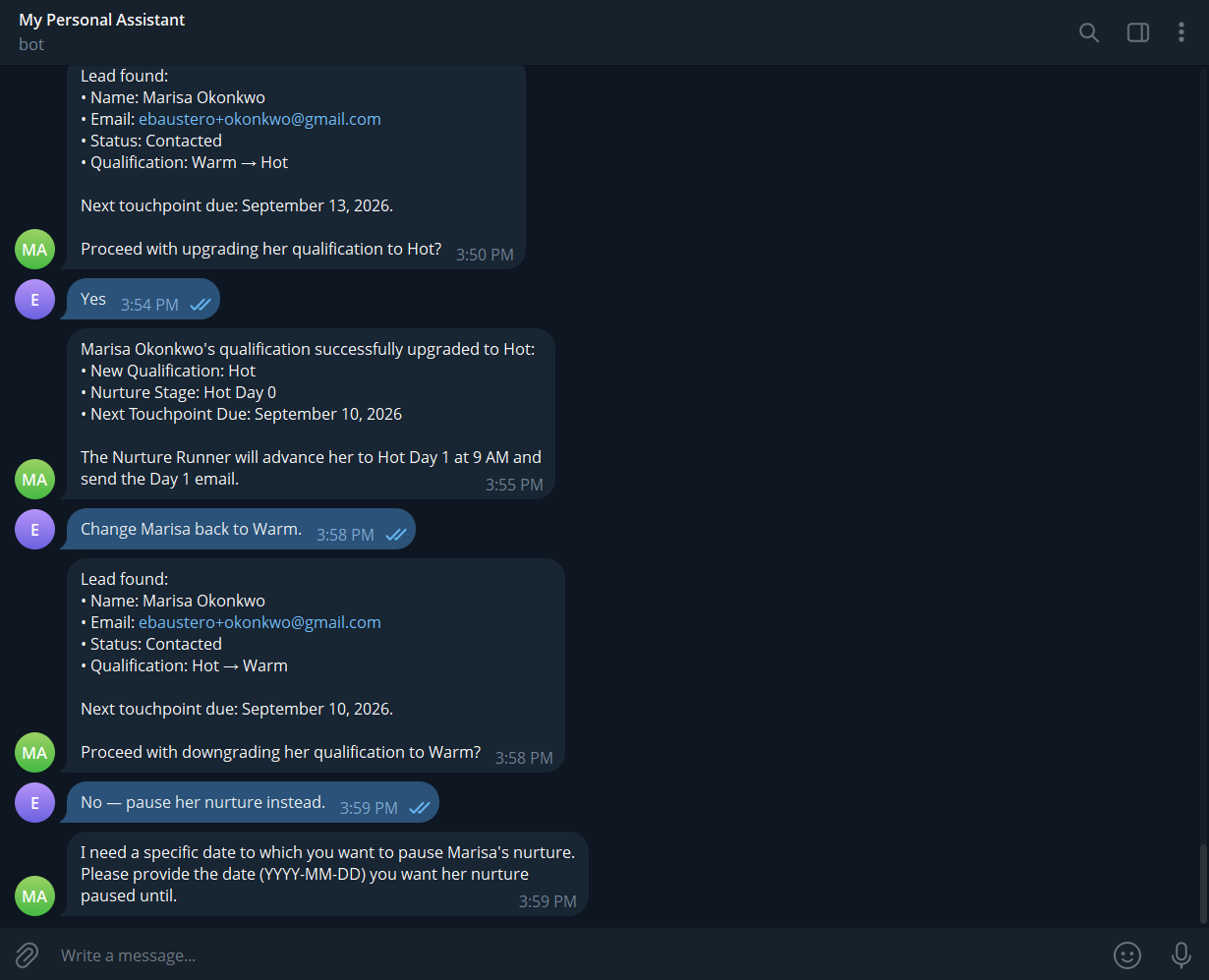
Natural-Language CRM Operations: The CRM can be updated through plain-language Telegram commands. Before writing data, the agent restates the proposed action and asks for confirmation. Qualification changes also show their downstream effect, and declining a change abandons it rather than assuming approval.
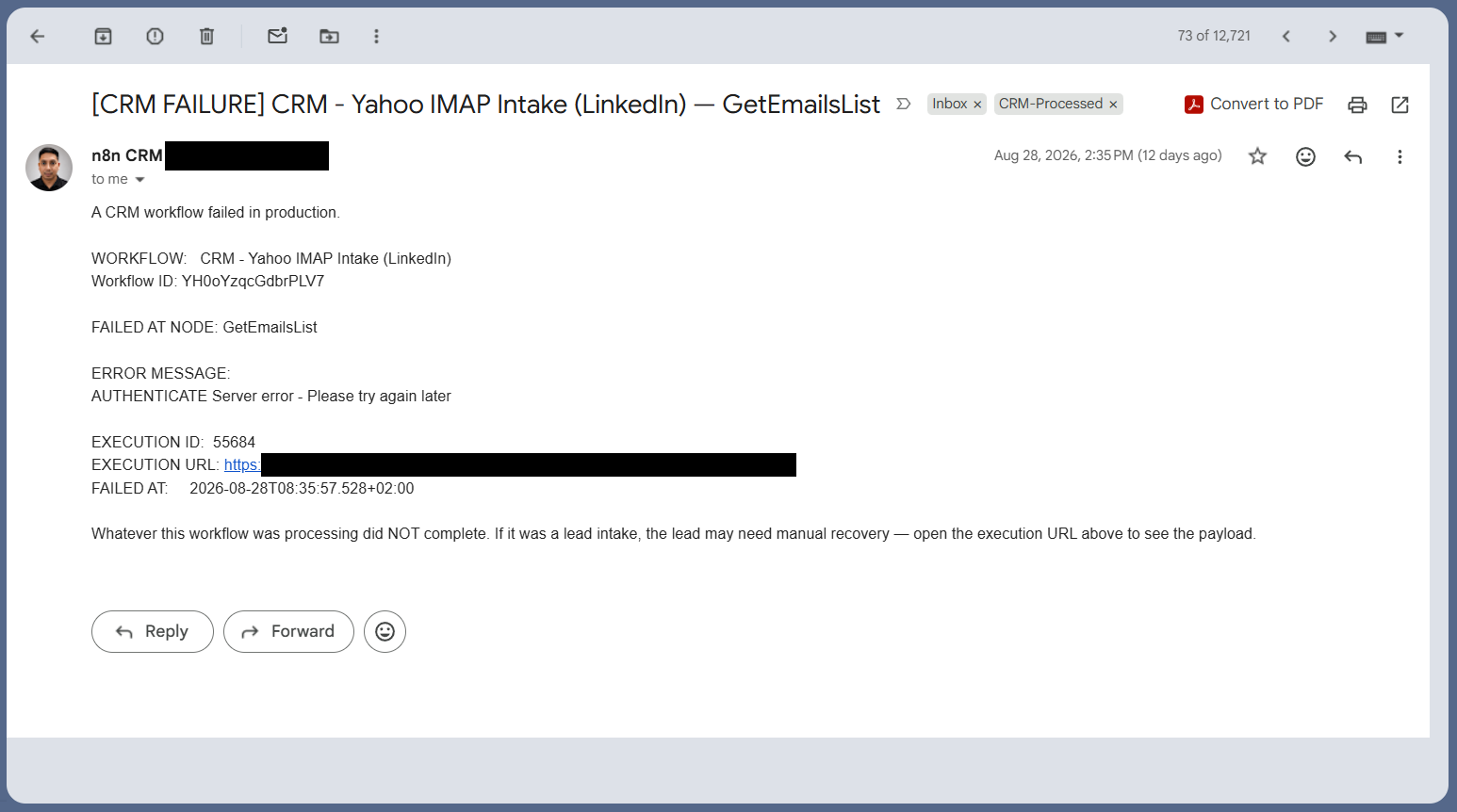
Production Error Alerting: A shared error handler surfaces workflow failures with the affected workflow, failed node, error details, and execution context so problems can be investigated and recovered instead of failing silently.
What Makes It Interesting
I identified emails by a label, and it eventually bit me.
The CRM emails alerts to the same inbox it polls for leads, so without a safeguard it feeds itself an infinite loop. My first fix discarded any email whose subject carried a `[CRM]` tag. It worked for six weeks. Then an internal email arrived without the tag and entered the lead pipeline as though a stranger had written it — because a subject-line convention is a habit, not a property of the message.
The replacement classifies mail by things it can’t misrepresent without failing authentication: who sent it, and which tagged address it was sent to. It’s the difference between identifying a document by what someone wrote on the folder and identifying it by its contents. A convention is a habit, not a property of the thing. The label is convenient and usually right; it isn’t evidence. Rewriting the approach rather than patching the filter also closed a second, unrelated defect in the same restructure.
Two leads arrived at the same second and one of them vanished.
No error, no warning — one record created, one lead gone. A node in the pipeline read only the first item of the batch, so when Gmail polled two emails in one window the second was silently discarded. Confirmed live: two widget submissions seconds apart, only the first recorded.
The fix wraps the entire pipeline in a batch-size-one loop. Ten emails now take ten passes instead of one, which for a solo pipeline costs nothing. It fixed the confirmed bug and structurally eliminated a second latent one — a data-pairing hazard in the lookup node that had never fired yet — because both had the same precondition: more than one email in flight at once.
Two fields that look identical, deliberately governed by opposite rules.
When a lead emails in, the system has two possible sources for their identity: the authenticated header the mail server provides, and whatever the AI extracts from the signature block. For the email address, the authenticated header wins. For the name, the AI-extracted version wins.
That looks inconsistent until you ask what each field does. An address determines delivery — get it wrong and your reply goes to a stranger. A name determines the greeting — get it wrong and it’s awkward. Different consequence, different rule. Applying one policy to both fields would have been tidier and worse.
Part of this system lives outside this system.
My published business address is `contact@eyreaustero.com`, but the intake only ever polled my personal Gmail. Mail to the business address sat in a mailbox no automation knew about — no error, because nothing had gone wrong. There was simply a door with nobody behind it.
A hosting-level forwarder fixed it, but the useful lesson was what it exposed: a mail forwarder and a provider-side filter rule are load-bearing parts of this CRM, and neither appears in any workflow export or any automated inspection. Delete either one and intake goes quiet with no alarm anywhere. Both are now recorded in a dedicated manual-changes section of the documentation, because a dependency that can’t raise an alarm about itself has to be written down instead.
Human approval where it changes the outcome, automation everywhere else.
Approval costs latency and attention, so I spend it only where a wrong message does real damage: Hot lead emails, cancellations I initiate, and anything following a call where the person was frustrated or asked not to be contacted. That last one is the case where an automated follow-up isn’t merely suboptimal but actively wrong. Warm and Cold template mail sends itself. It’s the same instinct as applying tight tolerances only to the dimensions that affect fit and function, not to every measurement on the drawing.
The failures worth designing against are the ones that raise no error.
Almost every serious defect in this project was silent: leads dropped from a batch, a record left unupdated because a background call failed unobserved, bot relays rerouted into the wrong branch, mail arriving somewhere nothing polled. In each case the system reported success.
This is the same rule my chatbots arrived at from the other direction, where an AI agent told a prospect their message had been sent when it never had: a component’s report of what it did is not evidence of what it did. Here it isn’t a language model doing the misreporting, it’s a node returning cleanly after quietly discarding half its input — but the remedy is identical. Verify from outside the component. “No node threw an error” is not the same as “the pipeline did its job,” and I now check those separately.
That’s also why the shared error handler exists. A separate automation of mine once ran broken for five weeks purely because nothing was wired to report it — and I only found out by happening to look.
Tech Stack
n8n (self-hosted)
Workflow orchestration for lead intake, qualification, nurture, approvals, booking lifecycle, voice integration, error handling, and CRM operations
Airtable
Lead database, nurture state, revision tracking, questionnaire responses, and system configuration
OpenAI GPT-4o-mini
Email classification, lead qualification, reply analysis, email drafting, and question answering
Retell AI
Outbound AI voice agent hosting, live conversation handling, and post-call processing
OpenAI GPT-5.1
Voice agent model for natural conversation and booking interactions
OpenAI GPT-5.4 Nano
Structured post-call outcome extraction through Retell
Twilio
SIP trunk and outbound telephony for the AI voice agent
Gmail API
Inbound lead detection, nurture emails, approval forms, notifications, and follow-up
Yahoo IMAP
LinkedIn-related notification monitoring and lead intake
Cal.com
Booking intake, confirmations, cancellations, reschedules, and discovery-call lifecycle
Telegram
Natural-language operator interface to the CRM Operations Agent
WordPress / Aveo Theme
Website contact form and pre-discovery questionnaire feeding the CRM pipeline
Submit the Request a Consultation form or book a discovery call to use the live CRM automation flow.
Description
June 24, 2026
AI-powered lead management system that captures inquiries from multiple channels, answers questions, qualifies leads, automates follow-up and booking workflows, and keeps the pipeline monitored and operable.