AskJohn AI: Website Chat Assistant
What It Does
An AI assistant embedded directly in my portfolio site. It answers visitor questions about services, pricing, process and background from a curated knowledge base, books discovery calls, and passes anything it can’t answer to me — without the visitor leaving the page.
It also settles an argument. A page that says “I build chatbots” and offers no chatbot is a claim with nothing behind it. This one is the evidence: the thing you’re reading about is running in the corner of the screen right now.
It is a live production channel under continuous maintenance, not a finished demo. It carries an open defect register, dated amendment files, and documentation versioned alongside the workflow.
Try It LiveThe Problem
A portfolio website that just lists services and a contact form is passive. The visitor reads, maybe bookmarks the page, and moves on. There’s no way to answer their specific question in the moment they’re thinking about it. For someone selling AI automation services, the portfolio site should demonstrate the product — not just describe it. A static page that says “I build chatbots” without offering a chatbot experience is a missed opportunity.
How It Works
A portfolio site that lists services and offers a contact form is passive. The visitor reads, maybe bookmarks it, and leaves. Nothing answers the question they actually had, at the moment they had it — and by tomorrow they’ve moved on.
For someone selling AI automation, that gap is also a credibility problem. The site should be the proof, not a description of the proof.
But putting a bot in front of real prospects raises a harder requirement than “make it talk.” It has to fail safely. A wrong answer to a prospect is worse than no answer, and a lost enquiry is worse than a slow one. Most of the engineering here went into those two sentences rather than into the conversation itself.
The agent, and its three permitted moves.
Every visitor message goes to an AI agent that must query a vector knowledge base before it answers — no exceptions, even when the question looks obvious. The agent can do three things and only three: answer from the knowledge base, book a discovery call, or relay a message to me. Everything else is redirected.
Specific facts — prices, timelines, tools, deliverables, process — may come only from the knowledge base. The agent may not invent them. There is one deliberate exception: when a visitor describes a project the knowledge base doesn’t cover, the agent may say the work falls within my general scope, in capability-level language only (“this is the kind of work Eyre does”), and steer to a call where a human can scope it properly.
It may characterise the category of work. It may never commit to a specific.
That single line is the design.
Booking and relay.
Two booking routes: the direct Cal.com link, or — for visitors who’d rather not use a booking page — the agent takes name, email and availability, notifies me, and sends a confirmation from a fixed template. The booking offer appears only on a closed list of three triggers: a contact-channel question, an explicit readiness signal, or stated hire intent. Questions about services or pricing are deliberately not triggers, even though a booking is the natural next step. The visitor decides when they’re ready.
When the knowledge base returns nothing and the question is genuinely out of scope, the agent offers to relay — and must include my direct contact details in the same message. The relay offer without them is forbidden, because the relay depends on the agent, the tools and Gmail all working, and the direct options depend on nothing at all.
The reliability layer.
Three mechanisms sit behind the agent, and they took longer to build than the agent did:
- A gate on when the agent may send email at all. Both conditions must hold: the visitor explicitly asked to be relayed or booked, and supplied name, email, and a message or availability. An email address appearing in a message is not a request to be contacted.
- A membership test for whether a send actually happened. The agent must read the tool’s response before saying anything, and treats the send as successful only if the returned labels include SENT. Absence of an error is not success.
- A Safety Net — a deterministic backup that runs after every turn and does not care what the agent claimed. It checks two facts: did the notification tool actually execute, and did the message contain an email address? If yes and no, I get the raw message anyway.
Any hard failure anywhere raises an alert through the same shared error handler the CRM estate uses, naming the workflow and the failing node.
Where the lead goes next.
A captured lead doesn’t land in an inbox and wait for me. It arrives at my Lead Capture CRM through a tagged relay address, which recognises it as bot-originated rather than as a stranger’s email, then qualifies it, sends an acknowledgment, and starts a nurture sequence appropriate to how ready the person is. The bot is the front door of a larger system, not a standalone widget.
Presentation.
The knowledge base stores plain URLs with no markdown, because it’s shared with my WhatsApp bot and the two channels render text in opposite ways. A code node after the agent normalises every URL and address into one canonical clickable form, whether the agent emitted it bare, wrapped, or wrapped with different display text. The widget also carries responsive breakpoints so it’s usable on a phone — frontend work that appears in no workflow export.
Architecture:
n8n, self-hosted on a Hostinger VPS. One workflow, 13 nodes, against a 40-entry shared knowledge base in Supabase with 10 turns of session memory.
Screenshots
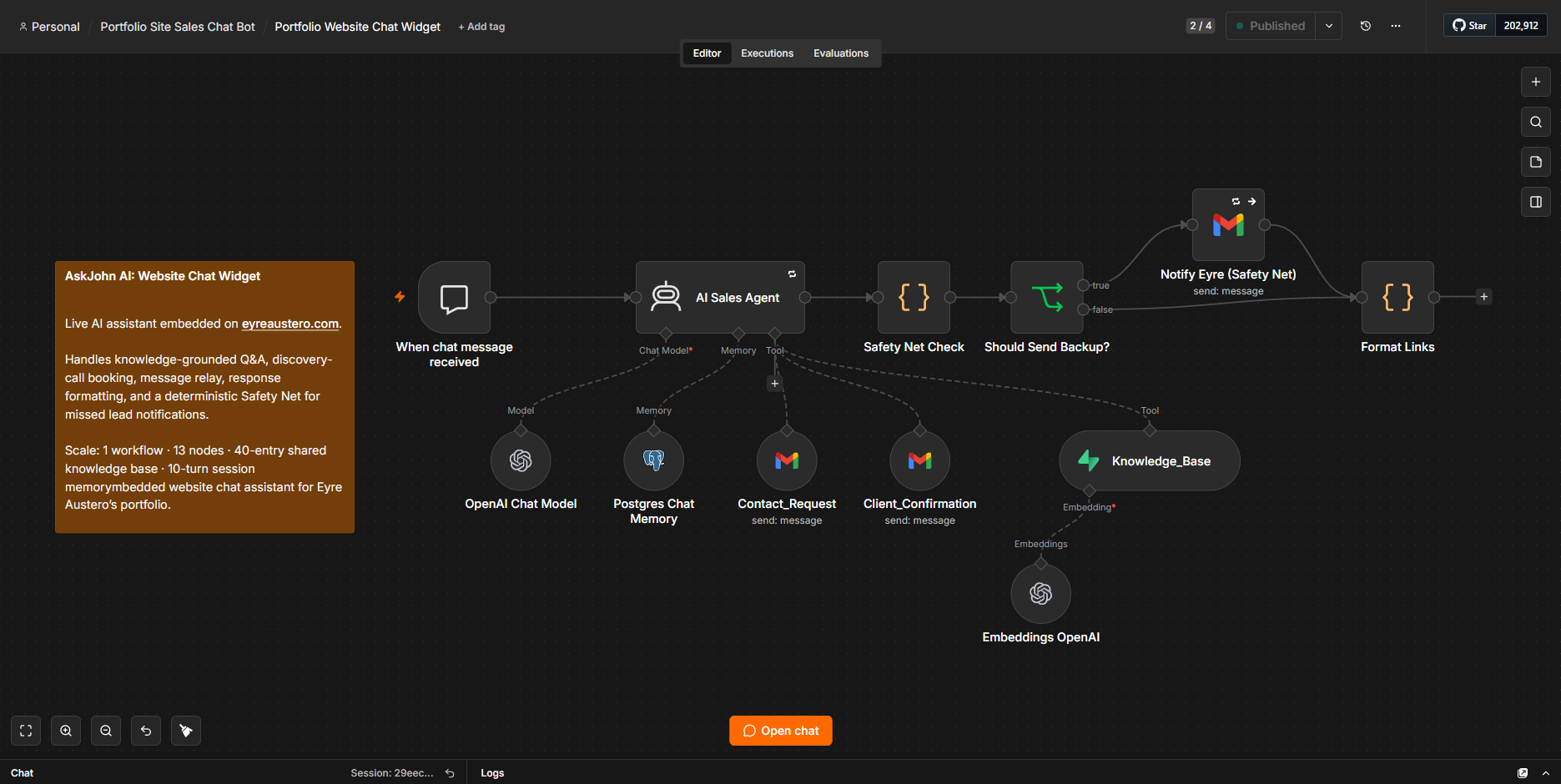
Main n8n workflow: routes website chat messages through the AI agent, shared knowledge base, booking and relay tools, link formatting, and a deterministic Safety Net for missed lead notifications.
Build scale: 1 workflow · 13 n8n nodes · 40-entry shared knowledge base · 10-turn session memory
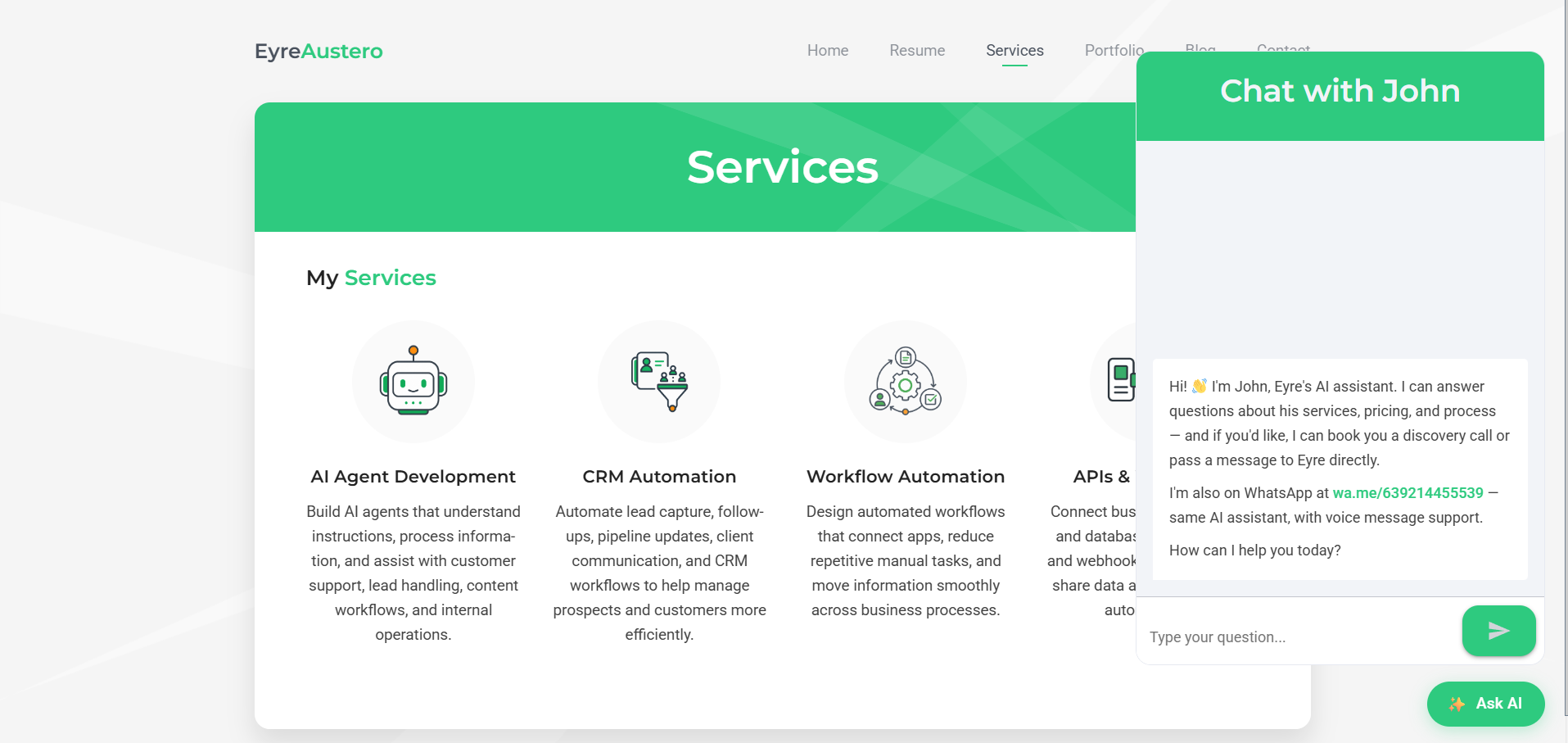
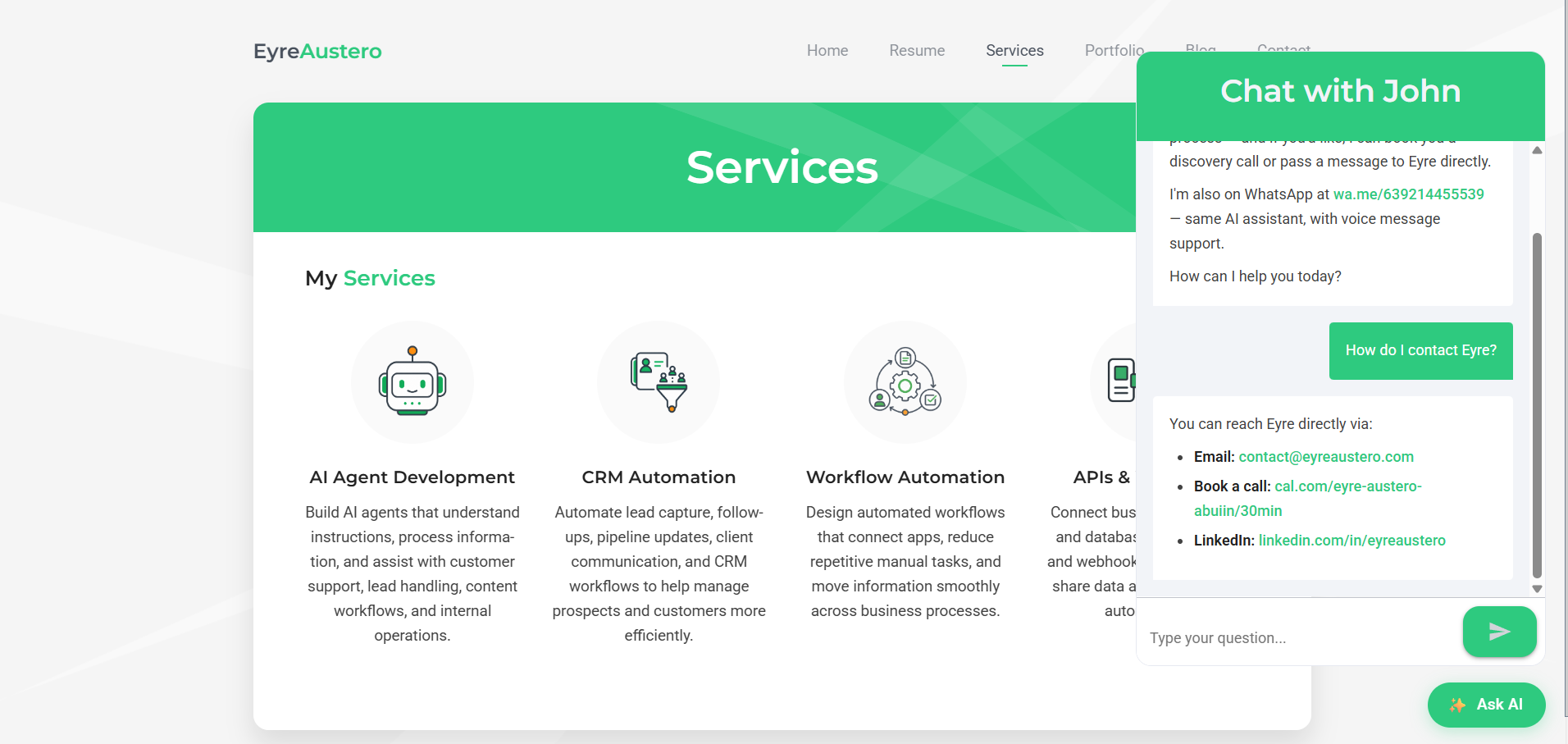
Website Chat Widget in Action: the embedded Ask AI launcher opens into a live assistant that answers knowledge-grounded questions, provides clickable contact links, and guides visitors toward booking or human follow-up when appropriate.
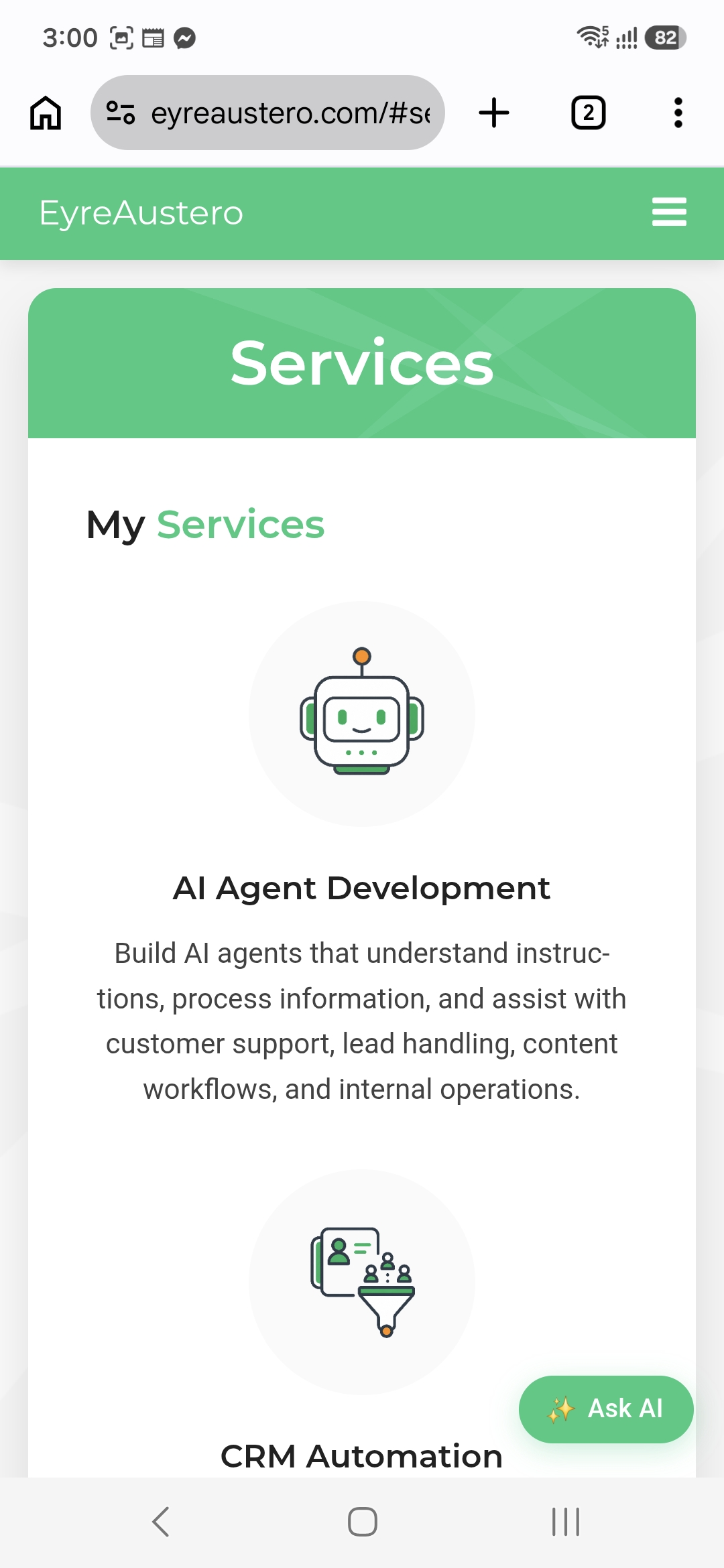
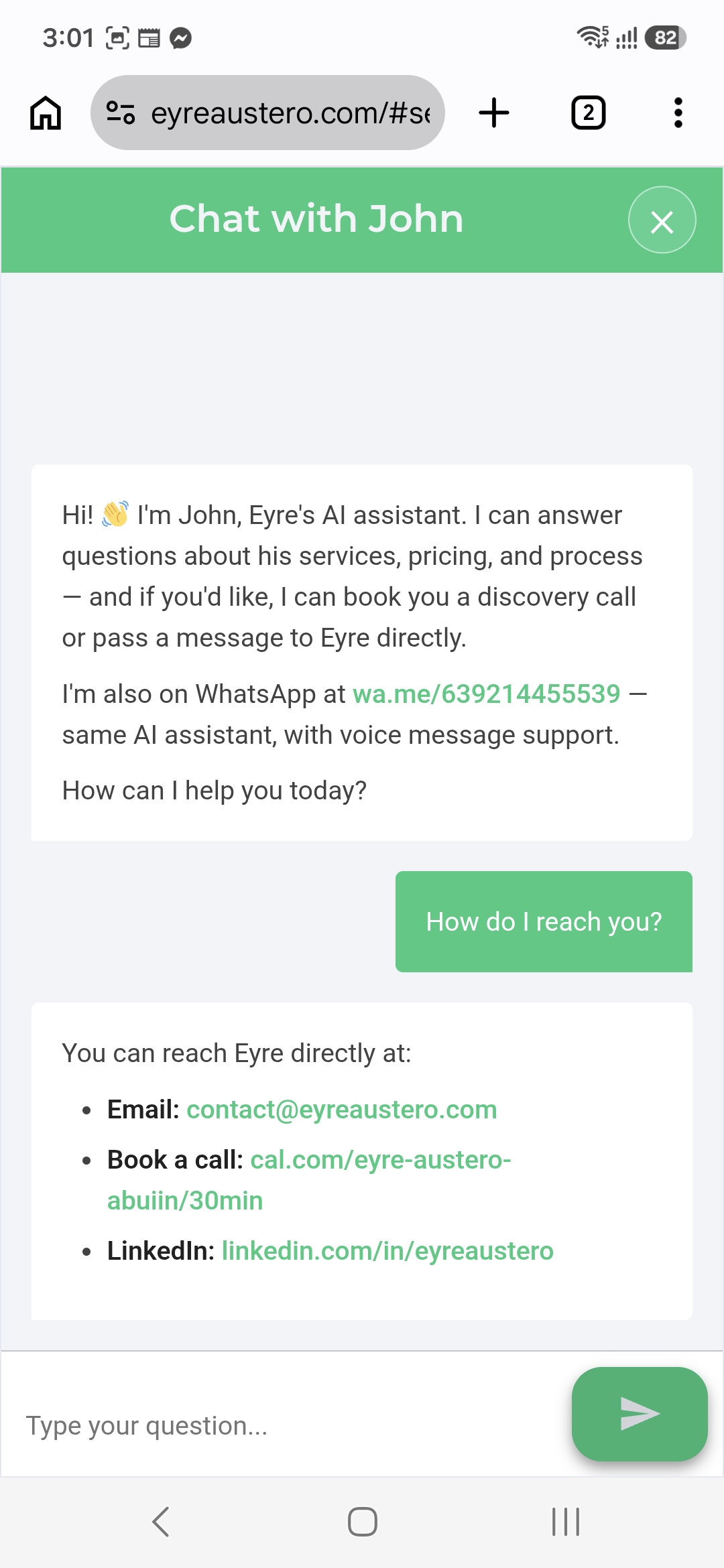
Responsive Mobile Experience: the compact Ask AI launcher expands into a full-screen Chat with John interface on phones, keeping the assistant readable and easy to use without crowding the underlying page.
What Makes It Interesting
The bot told a visitor their message was sent. It hadn’t been.
Not a fabrication from nothing — it had read its own earlier success message out of conversation memory and treated that as evidence the work was already done. It was, in its way, being consistent.
This is the worst failure a lead-capture bot can have, because it is invisible from every angle. The visitor is satisfied. The conversation reads perfectly. The enquiry simply never arrives, and nobody finds out.
The fix came in two layers, and the second is the one that matters. The prompt now states that every request is independent and an earlier reply is never proof the tools ran. That made the failure rarer. The Safety Net made it detectable — it inspects whether the notification tool actually executed and ignores the agent’s account of itself entirely. Prompt rules reduce probability. Structure provides guarantees. The general rule went out across the whole estate: a model’s report of what it did is not evidence of what it did.
The same rule, deliberately implemented backwards on the sibling bot.
My WhatsApp bot and this widget share a reliability rule: a Safety Net failure must never harm the client’s reply, and must never be silently swallowed. The two implementations are opposites.
The widget’s chat trigger uses response mode “last node” — whatever the final node outputs is what the visitor sees, which permits exactly one terminal node. That forces the Safety Net into the main line, where a Gmail failure would cost the visitor their answer. So it’s configured to continue on error. The WhatsApp bot’s Safety Net sits on a side branch that cannot touch the reply, so it deliberately does *not* continue on error — there, a hard failure should fail loudly and raise the alarm. Swallowing it would re-create the exact silent failure the error handler was wired to close.
One rule, two conforming implementations. The two nodes look nearly identical on the canvas, which is precisely the danger: a fix written once and pasted into both would break one of them, invisibly. It’s a standing warning in both sets of documentation.
Deterministic formatting where AI consistency falls short.
The AI wraps URLs in markdown correctly most of the time — but “most of the time” means a visitor might occasionally see a plain-text URL instead of a clickable link. Rather than adding more instructions to the AI’s prompt, I built a formatting step that runs after every response and normalizes all contact addresses into correct clickable links. It’s the same principle as adding quality control at the end of a production line: the upstream process is usually right, but the final check catches the exceptions before they reach the customer.
The safety mechanism had a hole written into it, for a sensible reason.
The Safety Net originally ignored any captured email address on my own domain — internal addresses shouldn’t generate lead alerts, obviously. Except the Safety Net exists for exactly one scenario: the agent claimed success and didn’t deliver. If that happened with an address on that domain, the backup stayed silent.
The filter was removed from both bots the same session. The shape is worth naming because it recurs: a plausible exception, added to the one component whose entire job is catching what everything else missed. A safety mechanism with exceptions is a safety mechanism with a gap.
A fix that doesn’t survive re-import isn’t a fix.
One of the email tools was vanishing on parallel calls — no error, no trace in the log. Root cause was a model-node setting sitting at its factory default, which changed how parallel tool results were packaged; under that packaging the first result was malformed and dropped. Turning it off restored both.
The setting appears nowhere in the workflow diagram, and it reverts if the node is recreated or the JSON reimported. So it lives in a dedicated manual-changes section of the documentation. Anything that can’t be reconstructed from the exported files is temporary by default — the same reason the mobile CSS and the widget’s runtime class overrides are written down rather than left to be rediscovered.
Saying what was tested, and what was only mitigated.
The Safety Net’s error tolerance was proven on the happy path live: it fired correctly, the visitor still got a normal reply, and the formatter was confirmed as the last node to run. The failure path was never forced. Doing so would have meant revoking a credential four other live workflows depend on, against a public site, to prove a declarative setting the interface already confirms is on.
So the documentation says what is true — happy path proven, failure path mitigated by configuration only — rather than rounding it up to “tested”. A reliability claim nobody has verified is worse than a gap you can name out loud.
Tech Stack
n8n (self-hosted)
Workflow automation — 1 workflow, 13 nodes, hosted on a Hostinger VPS
n8n Chat Widget
Frontend chat interface embedded directly in the portfolio website
OpenAI GPT-4o-mini
AI sales agent for conversation, knowledge retrieval, and tool use
Supabase / PostgreSQL
40-entry vector knowledge base shared with the WhatsApp AI sales agent
PostgreSQL
Session conversation memory with a 10-turn context window
Gmail API
Relay notifications, fixed-template confirmations, and backup lead capture
Cal.com
Discovery call scheduling
WordPress / Aveo Theme
Portfolio site hosting, widget styling, and responsive mobile CSS
Shared Error Handler (n8n)
Estate-wide failure monitoring and alerts for production workflow errors
Description
June 15, 2026
Live AI assistant embedded in the portfolio website that answers visitor questions from a verified knowledge base, helps with discovery-call booking, relays inquiries when needed, and connects captured leads to the CRM.