LeadFlow AI: WhatsApp Sales Agent
What It Does
An AI assistant running on a real WhatsApp Business number. It answers prospect questions about services, pricing, process and background from a curated knowledge base, books discovery calls, and passes anything it can’t answer to me — 24 hours a day, in the app they already have open.
It takes voice notes as well as typed messages. Someone can ask about pricing while driving and get a real answer, not a “we’ll get back to you.”
It is a live production channel under continuous maintenance, not a finished demo. It carries an open defect register, dated amendment files, and documentation versioned alongside the workflow.
Try It LiveThe Problem
WhatsApp is where a large share of the world does business, and across the Philippines and much of Southeast Asia it’s often the first channel a prospect reaches for. But a business number answered by a person has two failure modes: it goes silent outside working hours, and it forces the owner to answer the same five questions forever.
There’s a second problem that’s easier to miss. WhatsApp messages arrive in more than one form. A system that only handles text drops voice notes silently — which is the worst possible failure, because the sender has no idea they were ignored. They just think you didn’t care.
And putting a bot in front of real prospects raises a harder requirement than “make it talk.” It has to fail safely. A wrong answer to a prospect is worse than no answer, and a lost enquiry is worse than a slow one. Most of the engineering here went into those two sentences rather than into the conversation itself.
How It Works
Text and voice, converged before the thinking starts.
Inbound messages are sorted by type. Voice notes have their media ID resolved to a URL, are downloaded with authentication, and transcribed by Whisper. The transcript then enters exactly the same pipeline as typed text.
The branches converge before the AI agent, not after — which means every downstream rule governs both kinds of message automatically. A parallel path for voice would have meant two copies of the system prompt, the relay gate, the tool rules and the Safety Net. Two copies of a rule is two places to forget to update it.
The workflow also splits out the message array the moment it arrives, because Meta can deliver more than one message per webhook call. Reading only the first would drop the rest, undetectably.
The agent, and its three permitted moves.
Every message goes to an AI agent that must query a vector knowledge base before it answers — no exceptions, even when the question looks obvious. The agent can do three things and only three: answer from the knowledge base, book a discovery call, or relay a message to me. Everything else is redirected.
Specific facts — prices, timelines, tools, deliverables, process — may come only from the knowledge base. The agent may not invent them. There is one deliberate exception: when a prospect describes a project the knowledge base doesn’t cover, the agent may say the work falls within my general scope, in capability-level language only (“this is the kind of work Eyre does”), and steer to a call where a human can scope it properly.
When the question is out of scope:
If the knowledge base doesn’t have the answer, the bot offers to relay the client’s message to me directly. The client provides their name, email, and question. Two emails fire: one notifying me, one confirming to the client that their message was received. Direct contact options (email, Cal.com, LinkedIn) are always included so the client has choices.
It may characterise the category of work. It may never commit to a specific.
That single line is the design.
Because WhatsApp identifies the sender by phone number, the bot knows a first-time contact from a returning one and introduces itself exactly once — with de-duplication, so it never greets you twice in the same message.
Booking and relay.
Two booking routes: the direct Cal.com link, or — for prospects who’d rather not use a booking page — the agent takes name, email and availability, notifies me, and sends a confirmation from a fixed template. The booking offer appears only on a closed list of three triggers: a contact-channel question, an explicit readiness signal, or stated hire intent. Questions about services or pricing are deliberately not triggers, even though a booking is the natural next step. The prospect decides when they’re ready.
When the knowledge base returns nothing and the question is genuinely out of scope, the agent offers to relay — and must include my direct contact details in the same message. The relay offer without them is forbidden, because the relay depends on the agent, the tools and Gmail all working, and the direct options depend on nothing at all.
The reliability layer.
The reliability layer.
Three mechanisms sit behind the agent, and they took longer to build than the agent did:
- A gate on when the agent may send email at all. Both conditions must hold: the prospect explicitly asked to be relayed or booked, and supplied name, email, and a message or availability. An email address appearing in a message is not a request to be contacted.
- A membership test for whether a send actually happened. The agent must read the tool’s response before saying anything, and treats the send as successful only if the returned labels include SENT. Absence of an error is not success.
- A Safety Net — a deterministic backup running on a side branch after every turn, which does not care what the agent claimed. It checks two facts: did the notification tool actually execute, and did the message contain an email address? If yes and no, I get the raw message anyway.
Any hard failure anywhere raises an alert through the same shared error handler the CRM estate uses, naming the workflow and the failing node.
Where the lead goes next.
A captured lead doesn’t land in an inbox and wait for me. It arrives at my Lead Capture CRM through a tagged relay address, which recognises it as bot-originated rather than as a stranger’s email, then qualifies it, sends an acknowledgment, and starts a nurture sequence appropriate to how ready the person is. Someone can send a voice note at midnight and be qualified, acknowledged and scheduled for follow-up before I wake up. The bot is the front door of a larger system, not a standalone chatbot.
Presentation.
WhatsApp doesn’t render markdown — it has its own conventions, and a markdown link left intact displays to a prospect as literal punctuation around a URL. A code node after the agent converts the model’s output into WhatsApp-native formatting. Link previews are disabled on the send node, because WhatsApp otherwise expands the first URL into a card that pushes the actual answer off the screen.
Architecture:
n8n, self-hosted on a Hostinger VPS. One workflow, 24 nodes, against a 40-entry shared knowledge base in Supabase with 10 turns of memory keyed on the sender’s phone number.
Screenshots
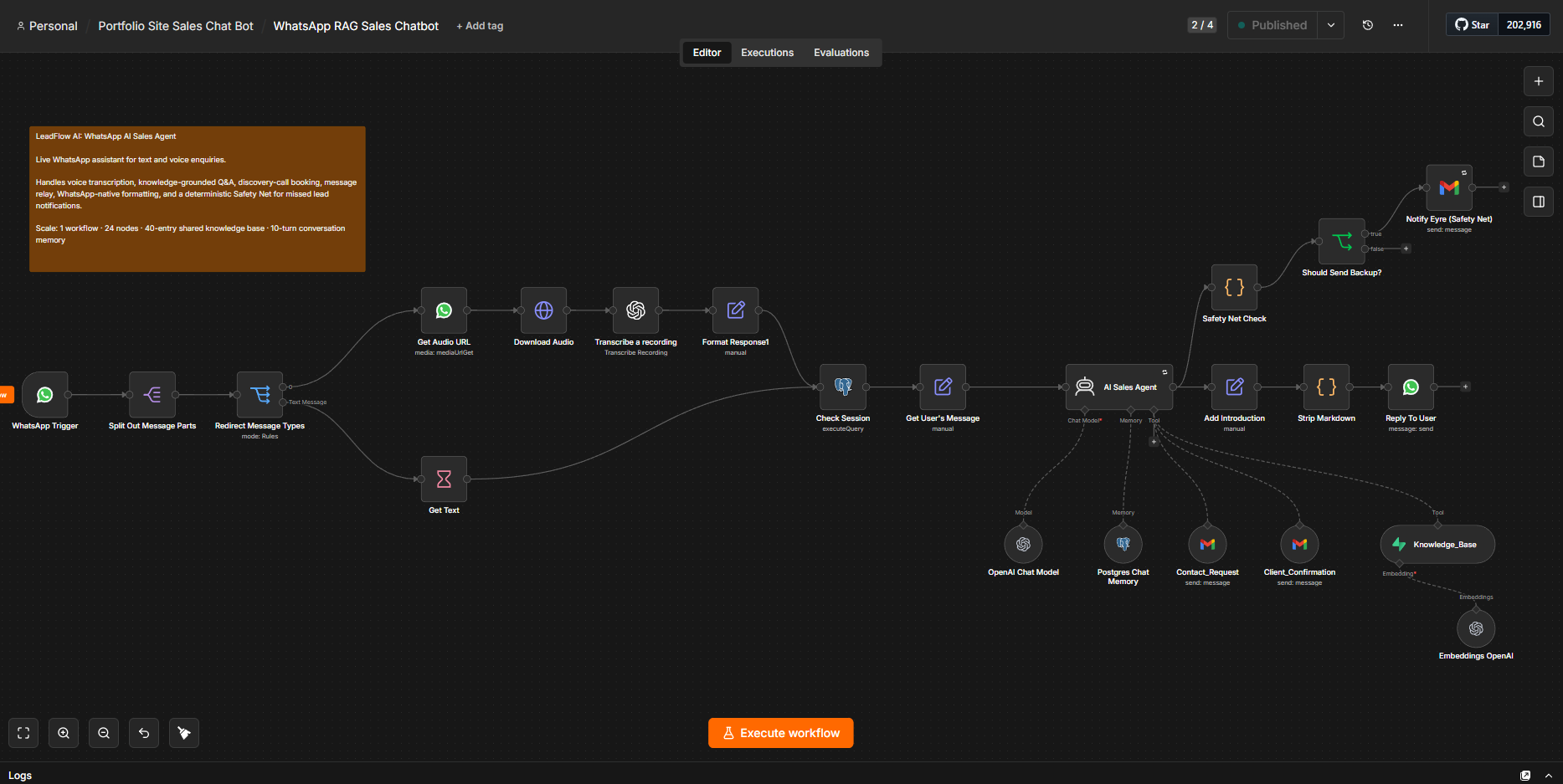
Main n8n workflow: routes WhatsApp text and voice messages through transcription, the AI sales agent, shared knowledge base, booking and message-relay tools, WhatsApp-native formatting, and a deterministic Safety Net for missed lead notifications.
Build scale: 1 workflow · 24 n8n nodes · 40-entry shared knowledge base · 10-turn conversation memory · text + voice support
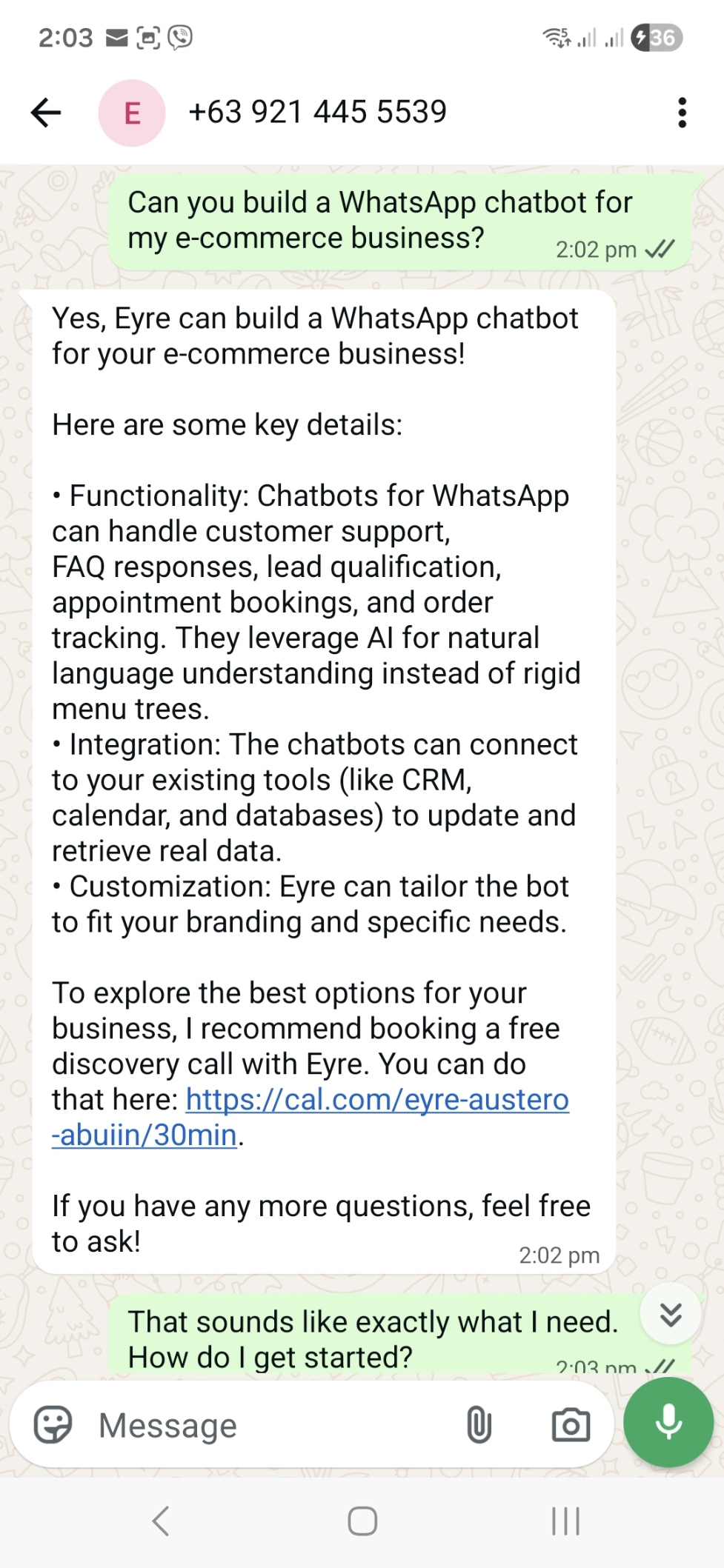
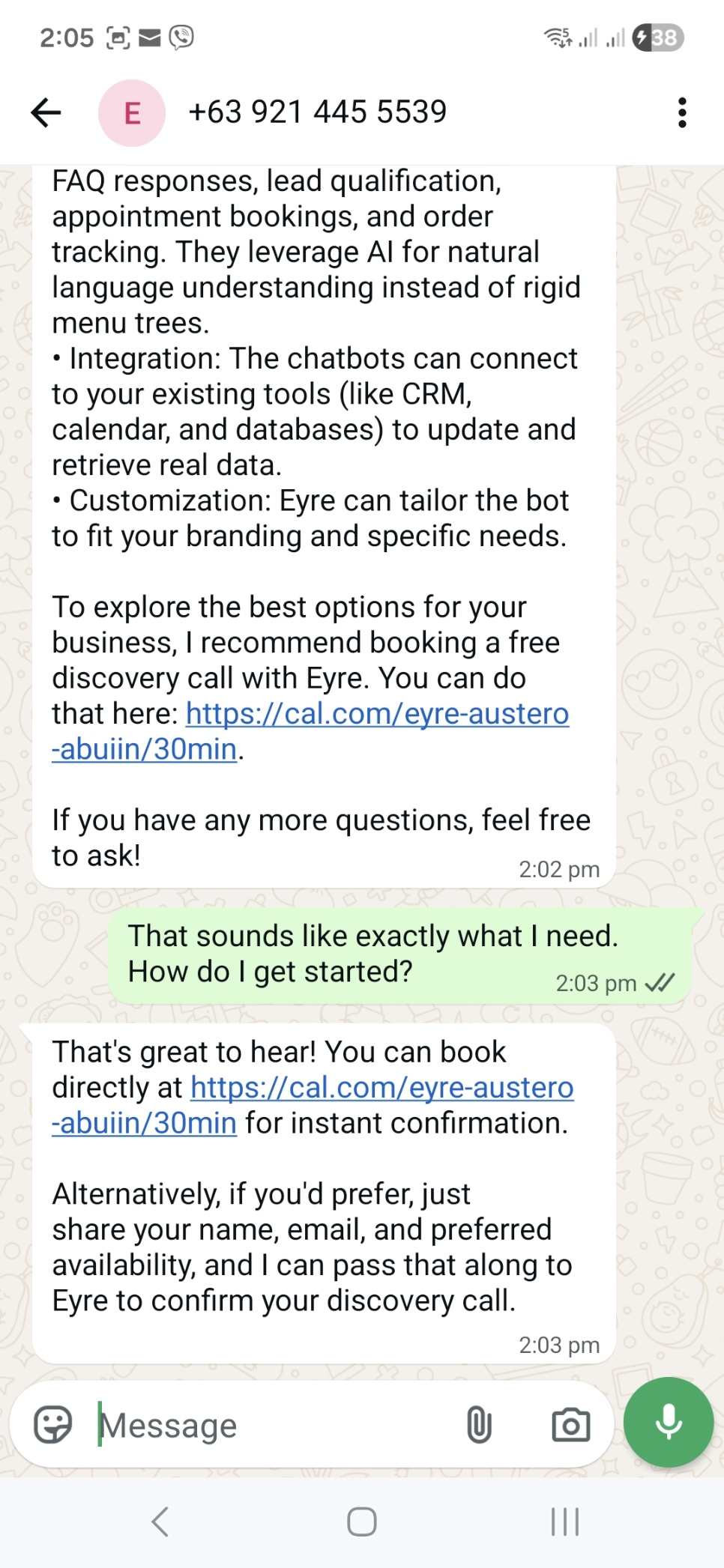
WhatsApp Bot in Action: knowledge-grounded service Q&A followed by a booking offer triggered only after the prospect signals readiness, with direct Cal.com booking or assisted scheduling.
What Makes It Interesting
The bot told a prospect their message was sent. It hadn’t been.
TNot a fabrication from nothing — it had read its own earlier success message out of conversation memory and treated that as evidence the work was already done. It was, in its way, being consistent.
This is the worst failure a lead-capture bot can have, because it is invisible from every angle. The prospect is satisfied. The conversation reads perfectly. The enquiry simply never arrives, and nobody finds out.
The fix came in two layers, and the second is the one that matters. The prompt now states that every request is independent and an earlier reply is never proof the tools ran. That made the failure rarer. The Safety Net made it detectable — it inspects whether the notification tool actually executed and ignores the agent’s account of itself entirely. Prompt rules reduce probability. Structure provides guarantees. The general rule went out across the whole estate: a model’s report of what it did is not evidence of what it did.
The same rule, deliberately implemented backwards on the sibling bot.
My website chat widget and this bot share a reliability rule: a Safety Net failure must never harm the client’s reply, and must never be silently swallowed. The two implementations are opposites.
This bot has a dedicated send node, so the agent’s output fans out — one branch formats and sends the reply, the other runs the Safety Net. Nothing in that branch can touch what the prospect receives. So a hard failure there is deliberately left to fail loudly and raise the alarm; swallowing it would re-create the exact silent failure the error handler was wired to close. The widget can’t do this: its chat trigger permits exactly one terminal node, which forces its Safety Net into the main line, where a failure would cost the visitor their answer. So *that* one is configured to continue on error.
One rule, two conforming implementations. The two nodes look nearly identical on the canvas, which is precisely the danger: a fix written once and pasted into both would break one of them, invisibly. It’s a standing warning in both sets of documentation.
Converting markdown to WhatsApp is not a find-and-replace.
The obvious version — swap double asterisks for single, unwrap the link syntax — breaks in three independent ways, and every break is visible to the prospect.
Code blocks are protected first, before anything else runs, because WhatsApp’s triple-backtick formatting suppresses all other formatting inside it: an asterisk in a code block must survive untouched rather than be read as emphasis. Emphasis conversion then runs through neutral placeholder characters instead of converting straight to the target symbols — because markdown bold becomes a single asterisk, and the very next rule, converting markdown italic, also uses single asterisks, so it would misread its own predecessor’s output. And nested sub-bullets get collapsed into their parent line, since WhatsApp has no indentation and a two-level list otherwise renders flat with the hierarchy silently gone.
None of this appears in a screenshot of a working conversation. All of it is the difference between a reply that reads as a professional message and one that reads as leaked source text. Presentation looks like polish applied at the end; on a client-facing channel it is the impression.
The safety mechanism had a hole written into it, for a sensible reason.
The Safety Net originally ignored any captured email address on my own domain — internal addresses shouldn’t generate lead alerts, obviously. Except the Safety Net exists for exactly one scenario: the agent claimed success and didn’t deliver. If that happened with an address on that domain, the backup stayed silent.
The filter was removed from both bots the same session. The shape is worth naming because it recurs: a plausible exception, added to the one component whose entire job is catching what everything else missed. A safety mechanism with exceptions is a safety mechanism with a gap.
A platform dependency with a date on it, found in August rather than October.
From October 1, 2026, Meta bills free-form replies inside the 24-hour customer service window per message. Those replies have been free since November 2024, and every answer this bot sends to an inbound lead falls into that category.
I found it, verified it against independent sources, logged it as a tracked backlog item, and scheduled a cost review before the date. It’s in this writeup rather than omitted because it’s a real constraint on the design: per-message billing turns reply count into an economic variable rather than a formatting preference. A design that splits a long answer across several messages costs several times one that doesn’t.
The website widget is unaffected — no per-message charge — which is itself the argument for having built two channels on one knowledge base instead of betting the whole channel strategy on one platform’s pricing. A dependency you don’t control is still a dependency you can watch.
Tech Stack
n8n (self-hosted)
Workflow automation — 1 workflow, 24 nodes, hosted on a Hostinger VPS
WhatsApp Business Cloud API
Messaging channel for inbound and outbound text and voice interactions
OpenAI GPT-4o-mini
AI sales agent for conversation, knowledge retrieval, and tool use
OpenAI Whisper
Voice note transcription before messages enter the main AI pipeline
Supabase / PostgreSQL
40-entry vector knowledge base shared with the website chat widget
PostgreSQL
Conversation memory keyed to the sender’s phone number with a 10-turn context window
Gmail API
Relay notifications, fixed-template confirmations, and backup lead capture
Cal.com
Discovery call scheduling
Shared Error Handler (n8n)
Estate-wide failure monitoring and alerts for production workflow errors
Description
June 14, 2026
AI-powered WhatsApp sales assistant that handles text and voice inquiries, answers questions from a verified knowledge base, offers discovery-call booking, and passes qualified inquiries into the CRM.